Course Evaluation Helper
Making Course Evaluations Effortless
Course evaluations are an essential part of university life, but they can be tedious and time consuming. The UIU Course Evaluation Helper was created to eliminate this friction, providing a simple, fast, and secure way to complete evaluations with just a few clicks.
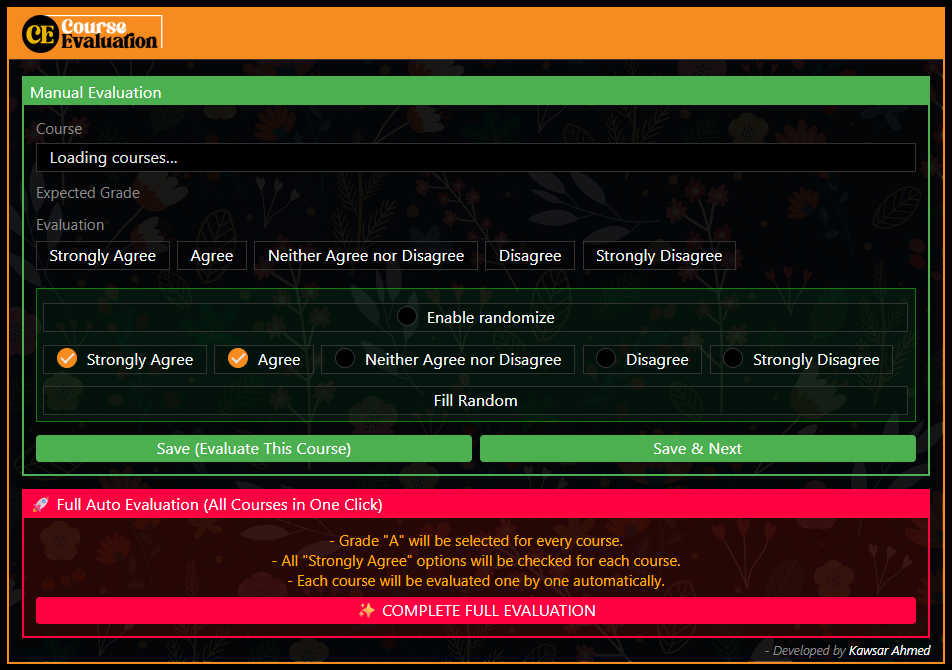
This browser extension streamlines course evaluations directly from a simple popup. Select the course and expected grade, apply your chosen answer to every question at once, or run Full Auto to process all courses in sequence. It's the evaluation experience every UIU student deserves.
Key Features
Course selector that syncs with the evaluation page. Buttons for quickly setting the Expected Grade. One‑click "Apply to All" for Strongly Agree, Agree, Neither Agree nor Disagree, Disagree, or Strongly Disagree.
Iterates through all remaining courses automatically. Sets Expected Grade to "A", selects "Strongly Agree" for all questions, saves, and proceeds until every course is done. Set it and forget it.
Private and Secure by Design
Your privacy is paramount. This add-on is built to be completely secure with a privacy first approach that ensures your data stays yours.
No data, analytics, or user activity is ever collected. What you do in the extension stays in the extension.
The add-on makes no external network requests. Everything happens locally in your browser. No data ever leaves your machine.
Code only runs on the active tab when you open the popup. No background processes, no resource consumption when not in use.
Minimal Permissions
This add-on requests only the bare minimum permissions needed to function. No unnecessary access to your browsing data or personal information.
- activeTab - To interact with the evaluation page when you click the icon
- scripting - To execute the automation scripts on the evaluation page
That's it. No storage permissions, no network permissions, no access to your browsing history.
How It Works
The extension is designed to be intuitive and straightforward, with two primary modes of operation to suit different preferences.
- Select a course from the dropdown
- Choose your expected grade
- Select your answer (Strongly Agree, Agree, etc.)
- Click "Apply to All" to fill all questions
- Save and move to the next course
- Click "Start Full Auto"
- Extension processes each course automatically
- Sets grade to "A" for each course
- Selects "Strongly Agree" for all questions
- Saves and proceeds until all courses are done
Browser Support
The UIU Course Evaluation Helper is currently available for Firefox with Chrome support coming soon.
Important Disclaimer
Use Responsibly
Course evaluations are a critical feedback mechanism for faculty members and the university. They directly impact teaching quality, curriculum improvements, and faculty development. This tool should not be used to spam or automate evaluations without genuine consideration.
The UIU Course Evaluation Helper is designed to streamline the process for students who have already thoughtfully evaluated their courses. It is not intended to replace meaningful feedback or to be used as a way to bypass the responsibility of providing honest, constructive evaluations.
Remember: Your feedback matters. Take a moment to genuinely consider each question before using automation tools. The quality of education at UIU depends on honest and thoughtful student evaluations.
Recommendation
Use the manual mode for each course to review questions first. Only use Full Auto mode if you are confident in your evaluation choices.
Challenges Faced While Developing the Project
Building a reliable content script extension required handling dynamic DOM changes and asynchronous form submission delays.
Adapting to unexpected changes in form radio button ID attributes across different university portal updates required robust selector fallbacks.
Ensuring full auto mode waited for page reloads after saving each course evaluation without losing execution sequence state.
Potential Improvements and Future Plans for the Project
Future plans involve extending browser compatibility and adding customizable evaluation preset templates.
Allowing users to save custom answer distributions such as balanced feedback ratings rather than uniform strongly agree selections.
Packaging the extension for WebExtensions Manifest V3 compliance to publish on Mozilla Firefox Addons store.