KeenKeeper
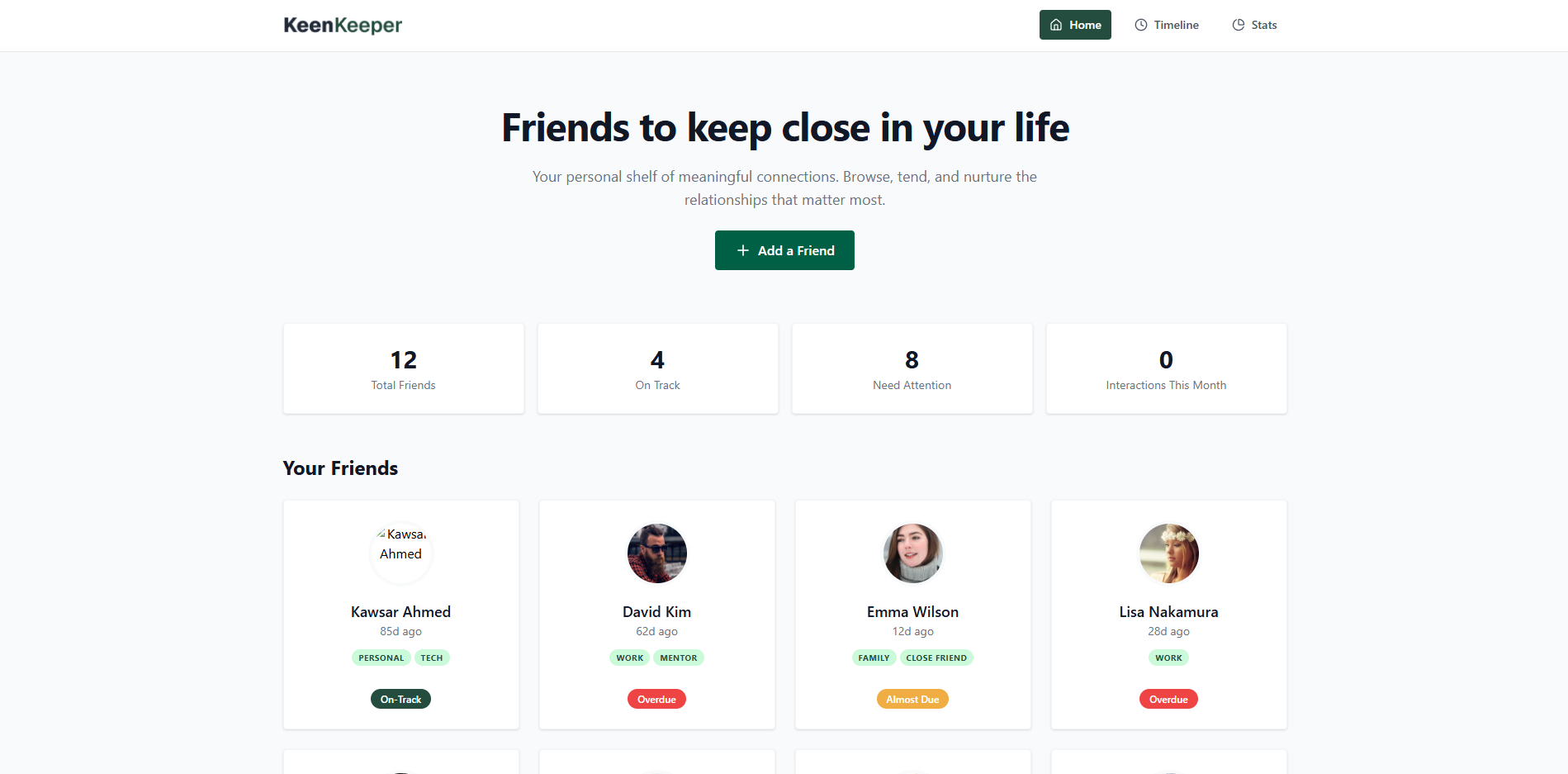
The Heart of KeenKeeper
In our fast paced digital world, maintaining meaningful friendships often falls by the wayside. KeenKeeper was born from a simple realization that relationships need active tending to flourish. It's your personal shelf of meaningful connections designed to help you browse, tend, and nurture the relationships that matter most.
KeenKeeper focuses on state management, dynamic data visualization, and client side routing. The project challenges developers to think about real world data relationships and create intuitive interfaces for managing complex social connections.
Why Relationships Need Tracking
Studies show that without conscious effort, friendships naturally drift. KeenKeeper solves this by providing a structured way to track interactions and set relationship goals.
View all your friends with quick status indicators (On Track, Almost Due, Overdue) in a responsive grid. Each card provides an at a glance view of your friendship health.
Quickly log calls, texts, and video chats on the fly. Every interaction adds to a historical record complete with search and filters for easy reference.
Visualize your communication habits via interactive pie charts to better understand how you keep in touch and where you might need to improve.
Building Realistic Friend Profiles
The heart of KeenKeeper lies in its data. Each friend profile is carefully structured with meaningful information that mirrors real relationships.
{
  "id": 1,
  "name": "John Doe",
  "picture": "https://example.com/photo.jpg",
  "email": "john@example.com",
  "days_since_contact": 12,
  "status": "overdue",
  "tags": ["college", "close friend"],
  "bio": "Met in university. Love hiking together.",
  "goal": 14,
  "next_due_date": "2025-07-20"
}The Friend Detail Experience
Clicking any friend card opens a detailed view with a two column layout designed to provide comprehensive information and quick actions.
Displays profile picture, name, status with color coding, tags, bio, and email. Action buttons for Snooze 2 Weeks, Archive, and Delete provide quick relationship management.
Stats Cards showing Days Since Contact, Goal, and Next Due Date. Relationship Goal Card with Edit functionality. Quick Check In Card with Call, Text, and Video buttons that log interactions.
The Timeline: Your Interaction History
The Timeline page serves as a comprehensive history of all interactions logged from friend detail pages. It transforms raw data into a meaningful narrative of your friendships.
Each Call, Text, or Video button click creates a new timeline entry with the current date and a descriptive title like "Call with Alex Johnson". Toast notifications confirm every action.
Filter entries by interaction type (Call, Text, Video) to analyze specific communication patterns. Each entry displays date, interaction icon, and friend name.
Advanced timeline features include sorting entries by date (newest or oldest) and searching timeline entries by friend name or interaction type for quick reference.
Understanding Your Communication Habits
The Stats page transforms interaction data into actionable insights through visual analytics powered by Recharts.
Pie charts display the distribution of Call, Text, and Video interactions, helping you understand your preferred communication channels and identify gaps.
Use these insights to make informed decisions about how to balance your communication methods and strengthen different types of friendships.
Thoughtful User Experience Design
Beyond core functionality, KeenKeeper incorporates several features that enhance the user experience and demonstrate attention to detail.
The entire application works flawlessly across mobile, tablet, and desktop screen sizes with a 4 column grid on large screens and adaptive layouts for smaller devices.
Custom 404 Page for invalid routes and loading animations during data fetching ensure a polished user experience even in edge cases.
Relevant toast notifications appear when users log interactions, providing immediate feedback and confirming actions have been recorded successfully.
The Technology Stack
KeenKeeper leverages a modern frontend stack chosen for its capabilities in handling state management, data visualization, and responsive design.
| Technology | Purpose |
|---|---|
| React | UI component architecture and state management |
| React Router | Client side routing and navigation |
| Tailwind CSS | Utility first styling and responsive design |
| Recharts | Interactive data visualization with pie charts |
| React Toastify | User friendly toast notifications |
| Lucide React | Clean, consistent icon set |
| Vite | Fast build tool and development server |
Project Architecture
The project follows a clean, component based structure that makes it easy to navigate, maintain, and extend.
kawsarcodes-keen-keeper/
├── README.md
├── eslint.config.js
├── index.html
├── netlify.toml
├── package.json
├── vercel.json
├── vite.config.js
├── public/
│   └── friends.json
├── src/
│   ├── App.css
│   ├── App.jsx
│   ├── index.css
│   ├── main.jsx
│   ├── components/
│   │   ├── Footer.jsx
│   │   ├── FriendCard.jsx
│   │   ├── Layout.jsx
│   │   └── Navbar.jsx
│   └── pages/
│       ├── FriendDetail.jsx
│       ├── Home.jsx
│       ├── NotFound.jsx
│       ├── Stats.jsx
│       └── Timeline.jsx
└── ui/
    ├── KinKeeper.fig
    └── KinKeeper.penpot
Deployment & Hosting
KeenKeeper is deployed on modern hosting platforms with support for Vercel, Netlify, and Cloudflare Pages.
Challenges Faced While Developing the Project
Designing an intuitive contact tracking workflow presented dynamic calculation and data structure obstacles.
Computing remaining contact window days dynamically based on varying relationship cadences required complex date comparison logic that accounted for leap years and month boundary shifts.
Structuring historical communication logs efficiently so that sorting and filtering by channel type did not impair page performance during repeated interactions.
Potential Improvements and Future Plans for the Project
Upcoming iterations aim to introduce automated reminder notifications and enhanced analytics integrations.
Integrating background scheduled jobs to send email alerts whenever a friend contact status transitions into overdue status.
Connecting with external Google Calendar endpoints to automatically schedule upcoming catch up appointments directly within user calendars.